Home ESS - 10 Month Update
In the original post, I walked through planning, installing and automating my home battery energy storage system. It's been about 10 months since then, so here's an update on how it's going, what's changed and answers to the questions I've been asked most.
Quick recap: the system is:
- Fogstar 16.1kWh battery,
- Victron Multiplus-II 48/8000/110-100 inverter, and
- CerboGX MKII,
All automated with Victron ESS and Home Assistant. Originally on the Octopus Agile tariff, now on Intelligent Octopus Go (more on that below). Total system cost was around £4000.
Contents
Savings Update
tl;dr: The original £900/year prediction for house-only usage was accurate. With the EV on top, total electricity savings are closer to £1,500/year vs what we'd pay at the old flat rate.
In the original post, I estimated savings of around £900 per year with a payback period of under 6 years. The Battery Payback Calculator predicted that shifting our ~13kWh/day of usage from the ~30p/kWh peak rate to the ~7p/kWh off-peak rate would save roughly £75/month.
Since then, we've added a PHEV and EV charger (more on that below), so even with our electricity usage going way up our costs have still gone down. Also worth noting: the IOG off-peak rate halved from 6.67p to 3.33p on 1st April 2026 as part of the government energy bill discount, which makes the April numbers even more dramatic. I have seen some information that indicates that isn't going to stay like that for long, but I'm enjoying it while I can!
Comparing the same months year-on-year tells the story pretty clearly:
March: 2025 vs 2026
- March 2025: 354 kWh, £107.04 (30.3p/kWh effective)
- March 2026: 600 kWh, £70.06 (11.7p/kWh effective)
70% more electricity, 35% less cost.
The bill breakdown: 548 kWh charged at the 6.67p off-peak rate and just 52 kWh at the 29.93p peak rate. 91% of all usage shifted to off-peak by the battery and IOG scheduling.
April: 2025 vs 2026
- April 2025: 352 kWh, £112.40 (31.9p/kWh effective)
- April 2026: 589 kWh, £51.50 (8.7p/kWh effective)
67% more electricity, 54% less cost.
April benefits from the lower rates (3.33p off-peak, 26.59p peak), with 523 kWh at off-peak and 66 kWh at peak. 89% off-peak.
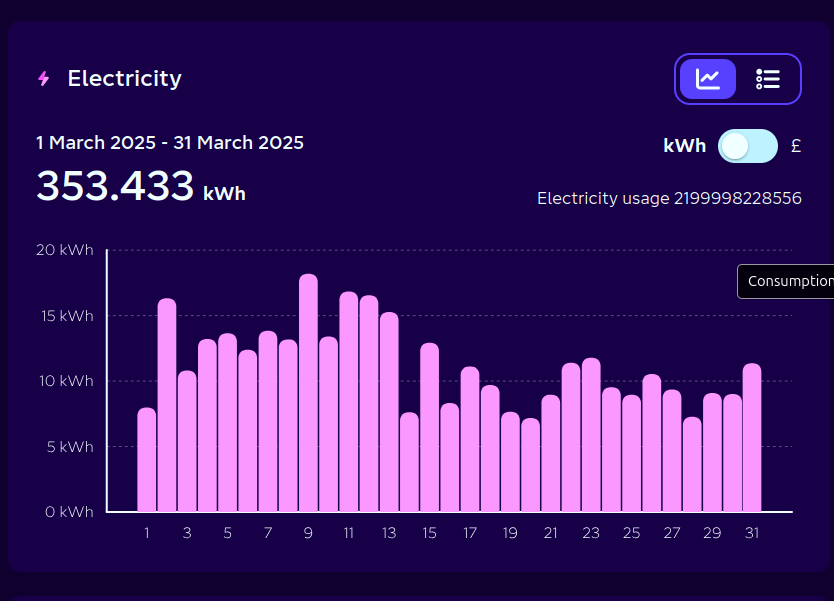
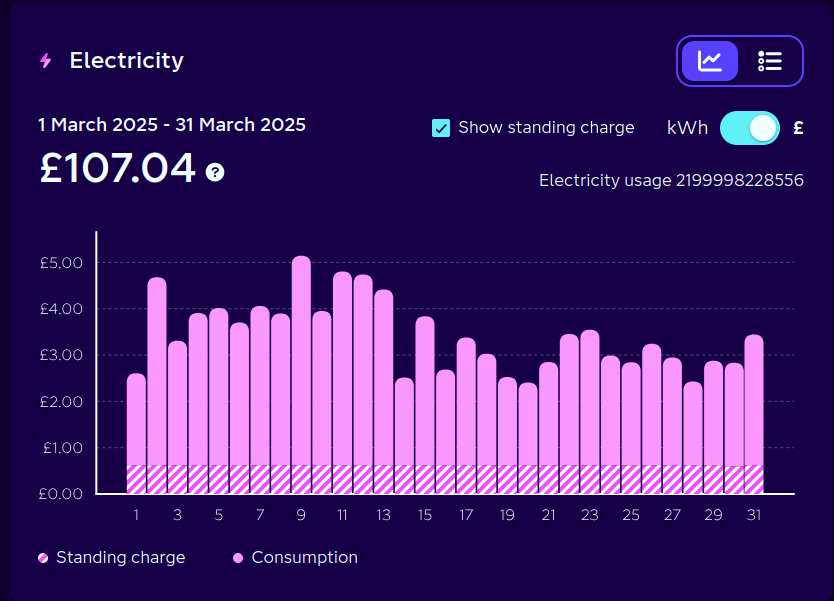
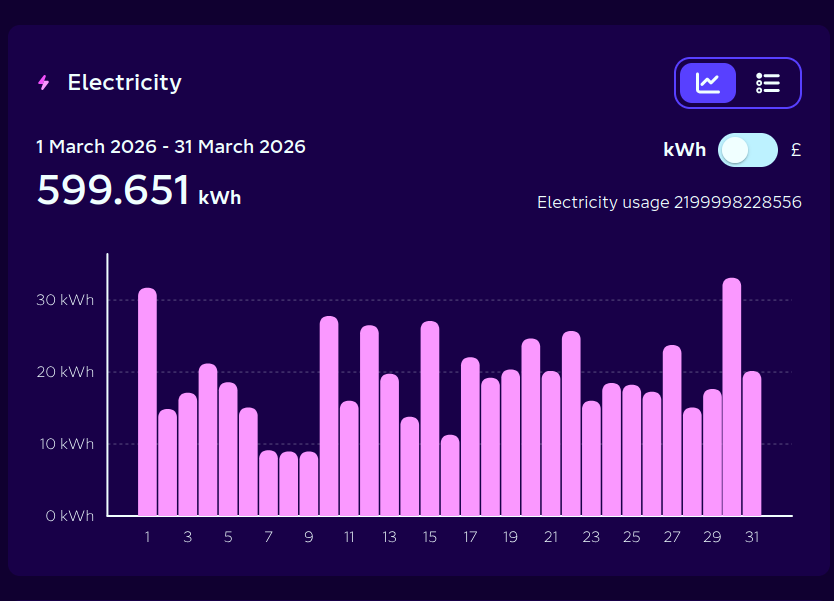
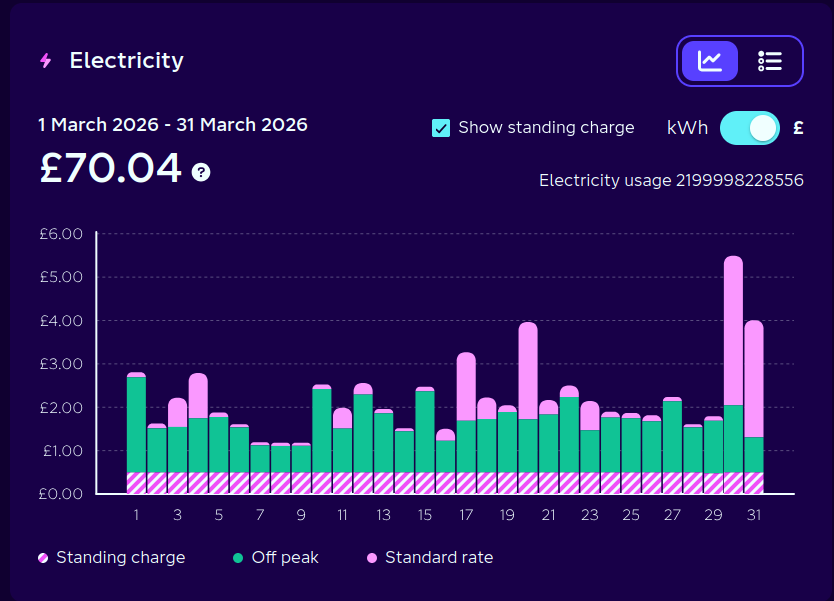
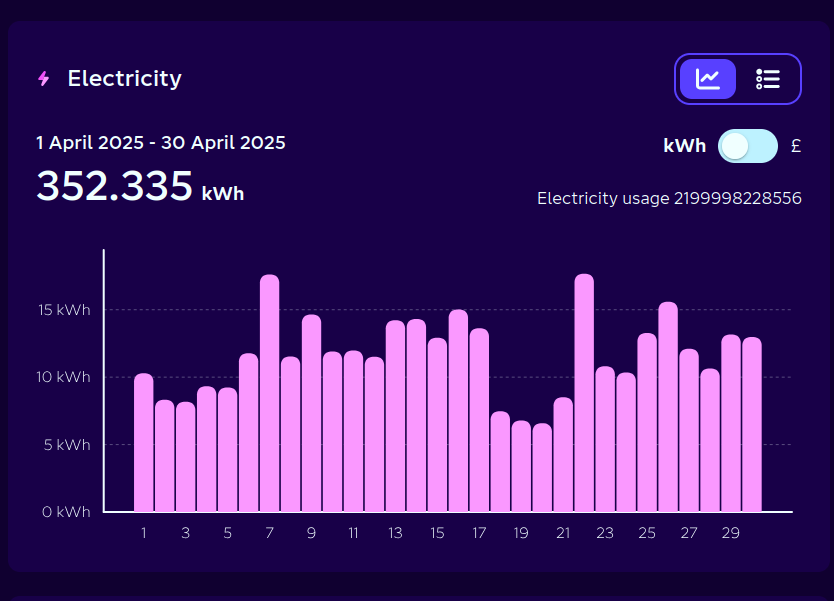
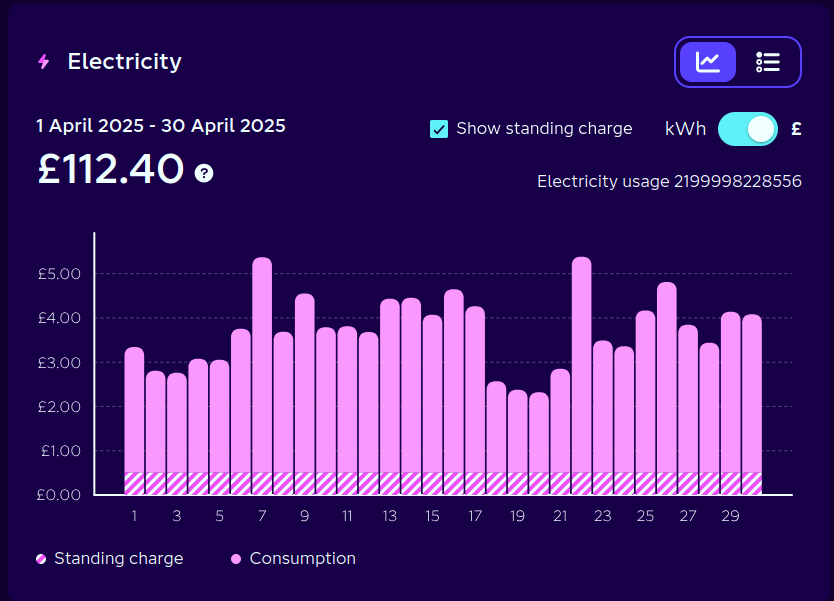
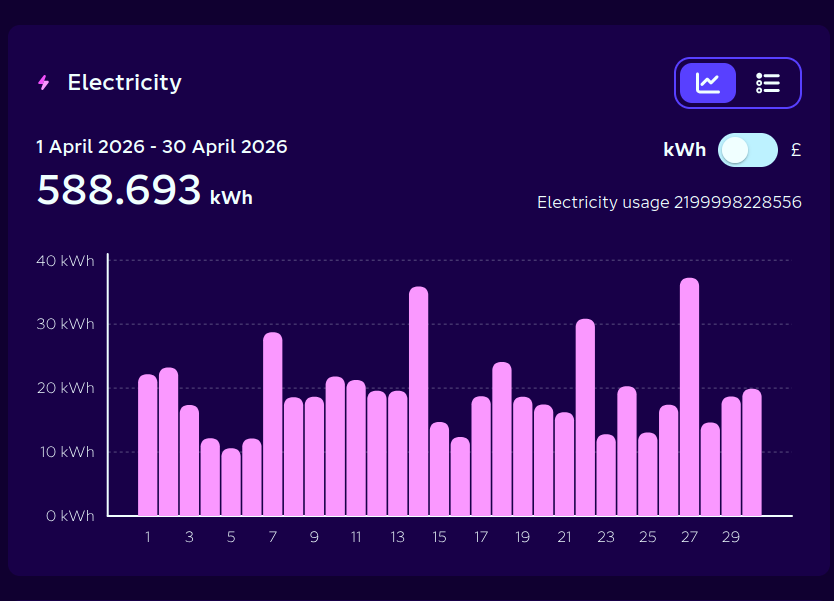
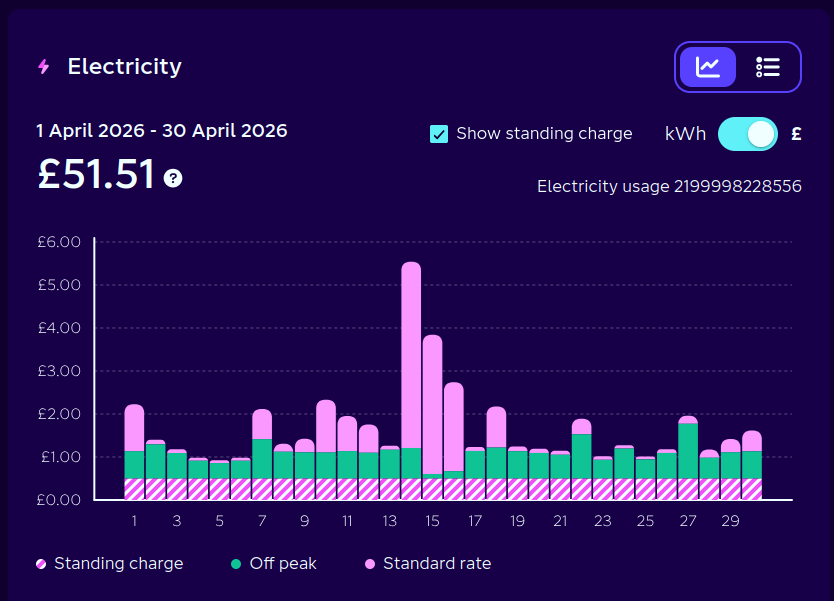
8 screenshots from Octopus Energy: usage and cost for March and April, 2025 vs 2026
Breaking down the savings
The year-on-year comparison is dramatic but slightly misleading because we're comparing different usage levels. Here's a clearer picture of where the savings actually come from, using March and April combined:
1. House-only saving (the original prediction)
House-only usage was about 353 kWh/month last year. If we keep that usage constant and just shift it to off-peak with the battery, the cost drops from ~£110/month (at the old flat rate) to roughly £35/month on IOG. That's a saving of about £75/month, or £900/year — right on target with the original prediction.
2. What the full usage would cost at the old flat rate
If all 600 kWh (March) had been charged at last year's effective rate of 30.3p/kWh, the bill would have been about £182. For April's 589 kWh at 31.9p, it would have been about £188. Combined: roughly £370 for the two months.
3. What we actually paid on IOG
£70.06 (March) + £51.50 (April) = £121.56.
That's a saving of about £248 over two months vs the old flat rate — roughly £124/month, or about £1,490/year. Of that, ~£900 comes from the battery shifting house usage to off-peak (the original prediction), and the remaining ~£590 comes from the EV charging at 3–7p instead of 30p.
The year-on-year comparison shows a more modest £97.89 saving, but that's comparing 1,189 kWh against last year's 706 kWh. We used 68% more electricity and still paid 45% less. The effective cost per kWh dropped by 67%.
Payback
The system cost ~£4,000. On house-only savings of ~£900/year the payback period is about 4.5 years, right in line with the original estimate. Factor in the EV charging savings and the payback drops to under 3 years - although the EV savings obviously depend on having an EV.
EV Charger Integration
In the original post, I mentioned we were getting a PHEV later in the year. Arthur (the car) arrived and we installed a Hypervolt EV charger. We're now on the Intelligent Octopus Go (IOG) tariff, which gives the whole house ~5.49p/kWh electricity during the off-peak overnight window and during smart dispatch slots when the car is charging.
Note: the offpeak rate on IOG seems to be a bit inconsistent at the moment. Perhaps due to large scale uncertainty in the market, I don't know, but one month our off peak rate was 3.49p/kWh!
Getting the EV and battery working together was pretty straightforward, easier than the automation for Octopus Agile. The only thing to solve was not letting the house battery charge the car and we're on a cheap electricity slot.
The Octopus Energy HACS integration exposes an
intelligent_dispatching binary sensor that tells you whether the car is currently in a cheap dispatch slot.
Combined with the Hypervolt integration's
charging readiness sensor, one automation handles four scenarios:
- Car charging on an IOG dispatch slot — set the ESS to "keep batteries charged" so the house battery tops up alongside the car at the cheap rate.
- Cheap rate detected (<10p/kWh), regardless of car — same thing, charge everything while it's cheap.
- Car charging at expensive rate outside a dispatch window — send urgent alerts to both phones. This has caught a couple of unexpected charging sessions where the car started drawing power when it shouldn't have been.
- Default (car not charging, rate normal) — ESS goes back to optimised mode, discharging the battery to power the house.
The Victron ESS has a BatteryLife state select entity with options like keep_batteries_charged
and with_battery_life (optimised mode). The automation just flips between these depending on what's
happening with the car and the current electricity rate.
Do Not Charge Car From Battery - Automation
alias: Do not charge car from battery
description: >-
  Charge home battery during intelligent dispatch slots or cheap rates, optimise
  otherwise
triggers:
  - trigger: state
    entity_id:
      - sensor.hypervolt_charging_readiness
    alias: Hypervolt Charging State Changes
  - trigger: state
    entity_id:
      - >-
        binary_sensor.octopus_energy_xxx_intelligent_dispatching
    alias: Intelligent Dispatching Changes
  - trigger: state
    entity_id:
      - sensor.octopus_energy_electricity_xxx_current_rate
    alias: Electricity Rate Changes
  - trigger: time
    at: "05:30:20"
actions:
  - action: octopus_energy.refresh_intelligent_dispatches
    metadata: {}
    data: {}
    target:
      entity_id: >-
        binary_sensor.octopus_energy_xxx_intelligent_dispatching
    continue_on_error: true
  - delay:
      hours: 0
      minutes: 0
      seconds: 10
      milliseconds: 0
  - if:
      - condition: time
        after: "05:30:00"
        before: "23:30:00"
    then:
      - choose:
          - conditions:
              - condition: state
                entity_id: sensor.hypervolt_charging_readiness
                state: Charging
              - condition: state
                entity_id: >-
                  binary_sensor.octopus_energy_xxx_intelligent_dispatching
                state: "on"
            alias: Car charging on dispatch slot
            sequence:
              - action: select.select_option
                target:
                  entity_id: >-
                    select.victron_mqtt_xxx_system_0_system_ess_batterylife_state
                data:
                  option: keep_batteries_charged
                alias: Set ESS to Keep batteries charged
              - action: notify.mobile_app_device
                metadata: {}
                data:
                  message: >-
                    🚙 Arthur is charging on a cheap dispatch slot — batteries
                    set to charge! 🔋
                  data:
                    clickAction: /energy-custom/0
              - action: persistent_notification.create
                data:
                  title: 🔋 Battery Automation
                  message: >
                    **Action:** Keep batteries charged (car charging on dispatch
                    slot)

                    **Trigger:** {{ trigger.description if trigger is defined
                    else 'Manual run' }}

                    **Charging readiness:** {{
                    states('sensor.hypervolt_charging_readiness') }}

                    **Dispatching:** {{
                    states('binary_sensor.octopus_energy_xxx_intelligent_dispatching')
                    }}

                    **Current rate:** {{
                    states('sensor.octopus_energy_electricity_xxx_current_rate')
                    }} GBP/kWh

                    **Fired at:** {{ now().strftime('%d/%m/%Y %H:%M:%S') }}
                  notification_id: battery_automation_status
          - conditions:
              - condition: numeric_state
                entity_id: >-
                  sensor.octopus_energy_electricity_xxx_current_rate
                below: 0.1
                alias: Rate is below 10p/kWh
            alias: Cheap rate (regardless of car)
            sequence:
              - action: select.select_option
                target:
                  entity_id: >-
                    select.victron_mqtt_xxx_system_0_system_ess_batterylife_state
                data:
                  option: keep_batteries_charged
                alias: Set ESS to Keep batteries charged
              - action: notify.mobile_app_device
                metadata: {}
                data:
                  message: >-
                    ⚡ Cheap rate detected ({{
                    states('sensor.octopus_energy_electricity_xxx_current_rate')
                    }} GBP/kWh) — batteries set to charge! 🔋
                  data:
                    clickAction: /energy-custom/0
              - action: persistent_notification.create
                data:
                  title: ⚡ Battery Automation — Cheap Rate
                  message: >
                    **Action:** Keep batteries charged (rate below 10p/kWh)

                    **Trigger:** {{ trigger.description if trigger is defined
                    else 'Manual run' }}

                    **Charging readiness:** {{
                    states('sensor.hypervolt_charging_readiness') }}

                    **Dispatching:** {{
                    states('binary_sensor.octopus_energy_xxx_intelligent_dispatching')
                    }}

                    **Current rate:** {{
                    states('sensor.octopus_energy_electricity_xxx_current_rate')
                    }} GBP/kWh

                    **Fired at:** {{ now().strftime('%d/%m/%Y %H:%M:%S') }}
                  notification_id: battery_automation_status
          - conditions:
              - condition: state
                entity_id: sensor.hypervolt_charging_readiness
                state: Charging
              - condition: state
                entity_id: >-
                  binary_sensor.octopus_energy_xxx_intelligent_dispatching
                state: "off"
            alias: Car charging outside dispatch at expensive rate
            sequence:
              - action: notify.mobile_app_device
                alias: Push Notification to Phil
                metadata: {}
                data:
                  title: 🚙 Arthur is charging when rates are expensive! ⚠️
                  message: Check and deactivate charging immediately ⚡🔌
              - action: notify.mobile_app_device_2
                alias: Push Notification to Shona
                metadata: {}
                data:
                  title: 🚙 Arthur is charging when rates are expensive! ⚠️
                  message: Check and deactivate charging immediately ⚡🔌
              - action: persistent_notification.create
                data:
                  title: ⚠️ Battery Automation — Expensive Charging!
                  message: >
                    **Action:** Alert sent — car charging outside dispatch slot
                    at expensive rate!

                    **Trigger:** {{ trigger.description if trigger is defined
                    else 'Manual run' }}

                    **Charging readiness:** {{
                    states('sensor.hypervolt_charging_readiness') }}

                    **Dispatching:** {{
                    states('binary_sensor.octopus_energy_xxx_intelligent_dispatching')
                    }}

                    **Current rate:** {{
                    states('sensor.octopus_energy_electricity_xxx_current_rate')
                    }} GBP/kWh

                    **Fired at:** {{ now().strftime('%d/%m/%Y %H:%M:%S') }}
                  notification_id: battery_automation_status
        default:
          - action: select.select_option
            target:
              entity_id: >-
                select.victron_mqtt_xxx_system_0_system_ess_batterylife_state
            data:
              option: with_battery_life
            alias: Set ESS to Optimized mode
          - action: notify.mobile_app_device
            metadata: {}
            data:
              message: >-
                🔋 Car not charging, rate normal — ESS set back to Optimized
                mode
              data:
                clickAction: /energy-custom/0
          - action: persistent_notification.create
            data:
              title: 🔋 Battery Automation — Default
              message: >
                **Action:** ESS set to Optimized mode (car not charging, rate
                above 10p)

                **Trigger:** {{ trigger.description if trigger is defined else
                'Manual run' }}

                **Charging readiness:** {{
                states('sensor.hypervolt_charging_readiness') }}

                **Dispatching:** {{
                states('binary_sensor.octopus_energy_xxx_intelligent_dispatching')
                }}

                **Current rate:** {{
                states('sensor.octopus_energy_electricity_xxx_current_rate')
                }} GBP/kWh

                **Fired at:** {{ now().strftime('%d/%m/%Y %H:%M:%S') }}
              notification_id: battery_automation_status
mode: restart
Automation Updates
Node-RED Removed
The Node-RED MQTT bridge from the original post (bridging the CerboGX's MQTT broker to Home Assistant's) has been replaced by the Victron MQTT HACS integration, which talks directly to the CerboGX. This simplified the setup and removed a potential point of failure. One fewer moving part.
Octopus Agile Scheduling
Since we've been on IOG, this is not used at all. IOG is cheaper (overall) and far simpler.
The Octopus Agile scheduling remained the most complex part of the system. The core approach from the original post hasn't changed much: find the cheapest half-hour slots, store them, and trigger charging during those windows.
I did try the Target Timeframes integration (which I mentioned in the original post), but I never managed to get it working consistently enough to rely on. The custom Python script and scheduling automations from the original post did all the heavy lifting.
Energy Usage Alert
I added an alert that triggers when grid usage goes above 6.5kW. The Multiplus-II can handle 8kW, but when the oven, kettle and washing machine are all on simultaneously it gets close. The alert sends phone notifications and briefly flashes the kitchen lights. It only triggers outside charging windows so it doesn't fire constantly overnight.
In practice it very rarely fires, but it's useful to know about and a good safety net.
Energy Usage Alert Automation
alias: Energy Usage Alert
description: "Alert when household power draw exceeds 6.5kW (close to inverter limit)"
triggers:
  - trigger: numeric_state
    entity_id:
      - sensor.shellyem_xxxxxxxxxxxxx_channel_1_power
    above: 6500
    alias: When energy usage is above 6.5kw
conditions:
  - condition: state
    entity_id: binary_sensor.battery_charging_window_active
    state: "off"
actions:
  - action: notify.mobile_app_device
    data:
      message: "⚡ Energy Usage Above 6.5kW ⚡"
      data:
        clickAction: /energy-custom/0
  - if:
      - condition: zone
        entity_id: person.shona
        zone: zone.home
    then:
      - action: notify.mobile_app_device_2
        data:
          message: "⚡ Energy Usage Above 6.5kW ⚡"
          data:
            clickAction: /energy-custom/0
  - action: light.turn_on
    data:
      flash: long
    target:
      entity_id:
        - light.desk_lightstrip
        - light.kitchen_spots_back
  - delay:
      hours: 0
      minutes: 0
      seconds: 15
      milliseconds: 0
  - action: light.turn_on
    data:
      color_temp_kelvin: 4507
      brightness_pct: 100
    target:
      entity_id:
        - light.desk_lightstrip
        - light.kitchen_spots_back
  - delay:
      hours: 0
      minutes: 10
      seconds: 0
      milliseconds: 0
mode: single
Grid Sensor Lost Alert
There have been a couple of occasions when an MCP has tripped and the ET112 grid sensor lost communication with the CerboGX. When this happens, the ESS can't function properly. A simple automation now alerts me immediately when the grid lost alarm triggers on the Victron system.
Grid Sensor Lost Alert Automation
alias: Alert when ESS Grid Sensor Lost
description: "Notify immediately when the Victron inverter reports a grid lost alarm"
triggers:
  - trigger: state
    entity_id:
      - sensor.victron_mqtt_xxx_vebus_276_vebus_inverter_alarm_grid_lost
    to:
      - alarm
conditions: []
actions:
  - action: notify.mobile_app_device
    data:
      message: " 🚨 ESS has lost grid sensor 🚨 "
      data:
        clickAction: /energy-custom/0
mode: single
When I get this alert, I know I need to pop out to garage and flip the MCP. I still haven't managed to identify the root cause of why it's tripping
Charge Session Tracking
The Battery Charge Session Tracker from the original post has been refined. It now logs when charging starts and ends, including the start and end SoC, and sends a notification with a summary. Short sessions (under 5 minutes, usually the battery topping off) are filtered out to reduce noise.
Victron GX Migration
Home Assistant 2026.5 introduced a core victron_gx integration at Platinum quality. This is set to replace the two
HACS integrations I've been running (Victron Modbus TCP + Victron MQTT), which between them created over 600 entities with a
lot of overlap and ~100 stale/unavailable entities.
I've planned my migration but haven't implemented it yet. The main work is remapping entity IDs across automations, the energy dashboard, and custom dashboards. The payoff is eliminating the HACS dependency for a critical system component and getting a much cleaner entity setup.
The new integration is written by the same author as the Victron MQTT HACS integration, so it should be a smooth transition. I'll update this post once it's done.
FAQs
These are compiled from questions I've received since the original post was published.
- Wiring & Installation
- ET112 Sensors
- Battery Sizing & Charging
- Tariffs & Automation
- System & Inverter Choice
- Configuration & Troubleshooting
- Useful Resources
Wiring & Installation
What size wiring do you have from the Victron back to the consumer unit, and what MCB?
10mm² cable — 12m open to air (with 10mm bond) inside the house, then 13m of 10mm armoured outside, joined at a junction box. It's on a 32A MCB (possibly 40A). The cable sizing was specced by Paul the electrician and verified with online cable calculators from electrical wholesalers. Worth running those numbers for your own install as cable length and installation method will affect things, but 10mm² over a reasonable run should be fine for the 8000.
Do I have a separate DC isolator or fuse between the battery and inverter?
No. The Fogstar's internal BMS handles overcurrent protection on the DC side. That said, if your supplier (e.g. Bimble Solar) recommends one for your specific setup, go with their advice — having an additional DC isolation point doesn't do any harm and gives you an easy way to fully isolate the DC side if you ever need to work on anything.
What cable connects the Fogstar battery to the GX device?
A VE.Can to CAN-bus Type-B cable. On my setup it connects to the VE.Can port on the CerboGX and the CAN-bus port on the Fogstar's BMS. If you have a MultiPlus-II with built-in GX rather than a separate Cerbo, double-check which port you need on the inverter side — but it should still be a CAN-bus Type-B connection on the Fogstar end.
Important config step: You need to change the connection type in Settings > Connectivity to "CAN-bus BMS LV (500 kbits/s)" for the GX to recognise the battery properly. This caught me out initially.
Can I take the battery kit with me if I move house?
Yes. The battery, inverter and Cerbo GX are all portable — they come with you. The only things that stay behind are the wiring and consumer unit work, which is a relatively small part of the overall cost.
How do I find a suitable electrician for this type of install?
This can be tricky — you want someone comfortable with Victron ESS installations specifically, not just a general electrician. Some suggestions:
- Victron has an installer/dealer network — check their website for someone in your area with ESS experience.
- Bimble Solar were brilliant for hardware and may be able to recommend an installer near you.
- The Victron Community forums are really active and UK installers post there — worth asking.
ET112 Sensors
Are all three ET112 sensors necessary?
No. The only ET112 that's essential for the Victron ESS is the grid meter — installed immediately after the meter, before any loads. This is the control input that tells the ESS what's being imported and exported so it can manage charging and discharging.
My other two ET112s (feed to garage and EV charger) are just for monitoring visibility — nice to have on the dashboards but the ESS doesn't need them to function. I added them because I wasn't confident in what I was doing and wanted more data. I've actually doubled up more than the diagram shows — each ET112 also has a Shelly CT clamp monitoring the same feed. The values are always within a margin of error and both feed into Home Assistant.
Where does the ET112 go in relation to the meter, loads and inverter?
This took me a while to figure out as the documentation isn't that clear:
- The ET112 needs to monitor the grid immediately after the meter, before any loads.
- The sense cables from the ET112 feed into the CerboGX.
- The CerboGX is the brain, which tells the inverter what to do.
- The ESS Assistant firmware gets installed on the MultiPlus, not the CerboGX — this confused me for a while too!
Can I use multiple ET112s to measure different circuits?
Yes, but you only need one configured as the grid meter for the ESS. Additional ET112s can be configured in different roles (PV meter, AC meter, etc.) for monitoring purposes. For a setup where you want to measure the house and garage but exclude the EV charger, a single ET112 measuring the house + garage tail (excluding the EV charger feed) should work well.
What is the ET112 on the EV charger for?
It's for monitoring, not for the ESS itself. The automation handles preventing the battery from discharging to charge the car — see the IOG dispatch slots question below. The ET112 on the EV charger circuit just gives me visibility of that load on the dashboards.
What is the yellow CT clamp sensor near the EV charger in the diagram?
That's a CT clamp that feeds into the EV charger itself. This is required so the EVC can automatically reduce its draw if the overall household draw gets too high. Consider the (improbable but possible) worst case: 6.6kW MultiPlus + 7.4kW EVC + 7kW oven + kettle + microwave + washing machine + tumble dryer is an insane max load that you have to account for. Most EV chargers require this kind of current sensing.
Battery Sizing & Charging
How long does the battery take to charge?
From real-world data with my 16.1kWh Fogstar and the MP-II 48/8000 inverter:
- 16% → 100% in ~2.5 hours (23:32 to 02:00)
- 17% → 100% in ~2.5 hours (23:30 to 02:00)
That's roughly 13.5kWh in 2.5 hours, at approximately 105–110A — basically the MP-II 48/8000's full 110A charger rating. The Fogstar BMS doesn't seem to limit it significantly.
With the smaller MP-II 48/5000 (70A charger), the same battery would take closer to 4–4.5 hours.
For a 32kWh battery with the 8000 inverter, expect roughly double — around 5 hours. Check this fits within your tariff's off-peak window.
How do I work out the right battery size for my usage?
Download your last 12 months of half-hourly readings from your Octopus account and run them through the Battery Payback Calculator. It calculates savings, payback period and charge time vs off-peak window based on your actual usage patterns.
As a rough guide: my average daily usage is ~13kWh and the 16.1kWh battery covers it most days. I only fully drain it on about 5% of days. If your daily usage is significantly higher (e.g. 25kWh+), a 16.1kWh battery will still save you money but won't offset all your peak usage.
The calculator shows four batteries — do I need four?
No! The calculator lets you compare up to four different battery configurations side by side. The screenshot on the blog shows the Fogstar 16.1kWh with two different inverter options, the Fogstar 32kWh, and the MyEnergi 20kWh system — just for comparison purposes.
Tariffs & Automation
Do I need Home Assistant to run this on Intelligent Octopus Go?
No. IOG has a fixed off-peak window (23:30–05:30), which is much simpler than Octopus Agile's half-hourly variable rates. The Victron ESS has built-in scheduled charging that handles a fixed off-peak window without needing Home Assistant or any custom automation.
Victron also have Dynamic ESS (DESS), which optimises charge and discharge cycles based on your energy prices and usage patterns. It works with fixed tariffs like IOG as well as dynamic ones, and it's configured through the Victron VRM portal — no coding or home automation needed.
The complexity in the original blog post is mostly around automating Octopus Agile. For IOG, once it's configured it's straightforward to manage.
Can the battery charge during IOG's extra dispatch slots (outside the normal off-peak window)?
Yes. The BottlecapDave Octopus Home Assistant integration exposes an intelligent_dispatching sensor that turns on
during both the standard 23:30–05:30 off-peak window and any extra dispatch slots that Octopus assigns
during the day.
Important caveat: The dispatching sensor can show as "on" during a dispatch slot even if the car isn't actually charging — and you won't get the cheap rate unless the car is genuinely drawing power. My automation checks both the dispatching state and whether the EV charger is actively charging before telling the battery to charge.
How does the system prevent the battery from discharging to charge the EV?
This is handled by automation in Home Assistant rather than by the ET112 sensors. My automation monitors:
- Whether the EV charger (Hypervolt) is actively charging
- Whether an IOG intelligent dispatch slot is active
- The current electricity rate
If the car is charging on a cheap dispatch slot → the battery charges too (cheap rate for both). If the car is charging outside a dispatch slot at expensive rates → it sends an alert. If nothing is charging and rates are normal → the ESS runs in optimised discharge mode. See the full automation in the EV Charger Integration section above.
Can I get basic monitoring without going deep into Home Assistant?
Yes. The Victron VRM portal gives you energy flows, system performance and usage data out of the box as a web dashboard — no Home Assistant needed. HA is only necessary if you want custom automations or deeper integration.
System & Inverter Choice
Do you have solar panels?
No. We live in a conservation area, in a mid-terrace with a small south-facing roof space with a large gable end, and the garage roof isn't strong enough. Solar isn't an option for us.
Victron vs alternatives (Solis, Luxpower, MyEnergi, GivEnergy)?
I can only speak to Victron + Fogstar, which has been great. I don't have experience with Solis, Luxpower or other inverter brands, so I can't compare directly. I chose Victron for the strong community support, depth of capability and solid Home Assistant integration. The more integrated systems (MyEnergi, GivEnergy) are designed to be simpler out of the box but cost more.
Victron's configuration has some complexity upfront, but once it's set up it's easy to manage — especially on a fixed tariff like IOG where the built-in ESS scheduled charging and DESS handle things without custom automation.
Can I keep my existing solar inverters and add a Victron battery system?
Yes — AC-coupling existing solar inverters is the simplest approach. The Victron MPPT charge controllers are designed for lower-voltage DC-coupled solar, so if your existing panels are in higher-voltage strings they may not be a good fit for the MPPT. Keeping your current solar inverters feeding into one of the consumer units works well — the ESS will see the solar production as reduced grid import.
Can I use the battery as a UPS for critical loads?
It depends on your layout. In my setup, the grid comes in at the front of the house and the inverter is in the garage (Grid > Load > Inverter), so using AC-OUT as a UPS for the house wasn't feasible. However, if your inverter is near critical loads (e.g. a server/network cabinet in the same garage), you could wire those loads off AC-OUT1. If the grid drops, the inverter keeps those loads running from the battery.
Configuration & Troubleshooting
My Cerbo GX reports "grid failure" even though the MultiPlus is connected to mains — what's wrong?
If the ESS Assistant shows mains frequency, voltage and current, the MP-II can see the grid — it's likely rejecting it rather than not seeing it. Common causes:
- Grid code: Check it's set to UK G99 in VEConfigure. Wrong country code = wrong frequency/voltage tolerances.
- Firmware: Make sure both the MP-II and Cerbo GX are on the latest firmware. Older versions have had bugs causing grid rejection.
- Grid metering: Check whether the ESS grid metering setting matches your setup — "External meter" if you have an ET112/CT sensor, "Inverter/Charger" if you don't.
- LOM (Loss of Mains) detection: This anti-islanding feature can falsely trip if cable impedance between the grid and MP-II is high (long or thin cables). For UK it should be on Type B. There's a "Weak AC input" option in VEConfigure that can help.
The Victron Community forums are the best place for troubleshooting specific configuration issues — there are people who have seen and solved pretty much everything.
Useful Resources
- Battery Payback Calculator — compare battery options with your actual usage data
- Victron Community Forums — invaluable for troubleshooting and design advice
- Octopus Forum — tariff-specific questions and automation ideas
- Bimble Solar — great for Victron hardware and advice
- BottlecapDave's Octopus HA Integration — foundation for Octopus automations in Home Assistant
- Victron + HA + EMHASS Guide — comprehensive HA integration guide
- Victron + Octopus IOG Scheduling via MQTT — tfboy's IOG automation approach
- Dynamic ESS for UK Octopus Users
- HA + Victron via Modbus TCP
- Venus OS Wiki
- ET112 Installation Guide
- Fogstar 16.1kWh Datasheet
If you have any other questions, feel free to email me. The original post with the full planning, installation and automation details is here.